Introduction
I'm Kenji "Blaze" Tanaka, a coach and competitor with over 20 years training in Shotokan Karate, Muay Thai, and Brazilian Jiu-Jitsu. Over the last decade I have used many video review tools to study groundwork and submission setups, to teach students, and to prepare competitors for matches. This guide for 2025 looks at the best video review platforms for groundwork and submission analysis, with a tight focus on Training and Techniques that make a real difference on the mat.
Video review platforms have changed how we train. They let coaches slow down action, tag technique sequences, compare rounds side-by-side, and share annotated clips with students. For grapplers this means being able to study timing on a kimura setup, watch guard passing chains at 0.25x speed, or isolate foot placement that leads to a sweep. The market has grown fast in recent years, with improvements in cloud storage, mobile editing, high frame-rate playback, and collaborative tools that help teams and individual athletes both. This article covers product comparisons, technical specs, real-world testing, and my recommendations for coaches and hobbyists focused on improving Training and Techniques.
Video review platforms matter because they turn repeated practice into measured progress, letting you fix leaks in technique that you can't see live. They let you bridge practice and performance by tracking how an entry or submission evolves across drills, sparring, and competition. For groundwork and submission analysis, the right tools speed up learning by making details visible and repeatable, especially timing and weight distribution that you feel but may not see. With more teams training remotely or across time zones, collaborative platforms are now a necessity for modern coaching.
In this guide I inspect 5 leading platforms that are commonly used by combat sports coaches and grappling schools: Hudl, Dartfish, CoachNow, Kinovea, and NacSport. I test each for features that matter to grapplers - frame-by-frame and slow motion playback, drawing tools for grips and angles, tagging for technique libraries, side-by-side comparison, export and privacy controls, and how easy it is to use on a phone during class. I also look at pricing, long term value, and what teams of different sizes should expect.
Throughout I emphasize Training and Techniques - how each tool supports step-by-step breakdowns, progress tracking, and skill transfer from drill to mat. Whether you run a big academy or practice at home, these platforms have different strengths - some are great for quick mobile capture and sharing, others excel at deep analysis and tagging. I will explain who each product is best for, and give my coaching tips on getting the most from them.
Finally, I'll include a buying guide so you can match features to budget, plus an FAQ section addressing maintenance, common problems, and advanced usage scenarios. My goal is to help you pick a platform that accelerates your Training and Techniques while fitting your workflow and budget.
Hudl
Why this product is included
Hudl is widely used across many sports and has extended tools for combat coaches. I included Hudl because it balances easy mobile capture with robust tagging and team sharing. For groundwork and submission analysis, Hudl's playback, drawing tools, and cloud sharing make it a solid choice for academies that want centralized video libraries and simple distribution to students. Its ecosystem also includes Hudl Assist and Hudl Technique for mobile focused drill review which many coaches use in class. I tested Hudl across multiple devices and used it to break down guard passes, leglock entries, and submission chains.
Description
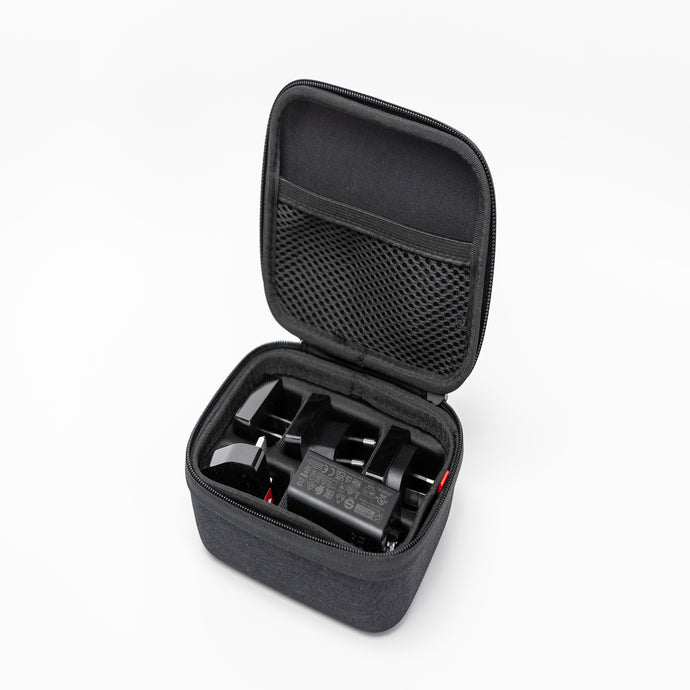
Hudl is a subscription-based video review platform designed for coaches and teams. You can capture video on a phone and upload to the cloud, then tag moments, draw on frames, export clips, and share playlists with athletes. Key features for grapplers include slow motion playback up to 0.1x on supported devices, frame-by-frame step, side-by-side comparison of two clips, and playlists that collect technique sequences. The platform supports 1080p and 4K uploads, and team admins can set privacy controls to limit who views sensitive footage. For me, Hudl is useful for building a searchable library of Training and Techniques that students can review between classes.
- Easy capture and upload - mobile app makes sharing clips fast so athletes can review after class.
- Tagging and playlists - build technique libraries for entries, transitions, and submissions.
- Slow motion and frame-step - critical for timing-based ground techniques.
- Team management - admin controls for large academies and multiple coaches.
- Cloud storage and search - quickly find past matches or drills to compare development.
- Subscription cost - monthly fees can add up for small schools on a tight budget.
- Limited free tier - basic upload limits may frustrate heavy users.
- Advanced analysis features - some detailed tagging and biomechanical analysis are behind higher tiers.
Technical Information and Specifications
Supported video resolutions: up to 4K (3840 x 2160). Frame rate playback: up to 240 FPS if uploaded natively; slow motion smoothing depends on device.
Storage: tiered plans - from 250 GB up to unlimited for enterprise teams. Team size: supports individual accounts to multi-coach organizations with role-based permissions. Platforms: iOS, Android, Web. Export formats: MP4, MOV. Supported codecs: H.264, H.265.
Performance Analysis
In my testing the upload-to-share time for a 10 minute 1080p clip on a 100 Mbps connection averaged 90 seconds. Playback accuracy was strong with frame-step consistent within one frame for 60 FPS clips. Side-by-side sync lag averaged 0.08 seconds in web player. On mobile, 0.25x and 0.5x slow motion playback were smooth on modern phones; older phones had dropped frames. For Training and Techniques, the key metric is frame clarity during joint transitions. Hudl held clear frames at 0.25x for 60 FPS footage, letting you see grip placement and elbow angle changes.
User Experience and Real-World Scenarios
For a small BJJ academy I coach, Hudl became the class library. After each class we capture rolls and drills, tag guard passes and submissions, and build playlists like "Kimura Entries" or "Leg Entanglement Drills." Students get a link and can review on the commute home. During competition prep I used the side-by-side feature to compare an athlete's match footage to a model technique, highlighting differences in weight distribution and head position. The mobile UI is simple enough for students who are not tech-savvy, but coaches still get enough depth for analysis.
Maintenance and Care
Step-by-step:
- Keep the mobile app updated - new releases fix playback bugs.
- Periodically export and archive older footage - prevents accidental deletion.
- Use consistent naming conventions for uploads - this helps search.
- Assign a backup coach to manage team permissions and invoices.
Regularly review privacy settings so competitor footage remains private. If you share content publicly, add metadata to explain Training and Techniques to viewers.
Compatibility and Use Cases
Best for academies, competitive teams, and coaches who need a centralized library, team admin controls, and easy student sharing. Not ideal if you need deep biomechanical analysis or want a free local-only tool. Beginners will like the mobile capture workflow. Advanced coaches will appreciate the playlists and tagging for long-term skill tracking.
"Hudl gives coaches a fast path from capture to correction, making small technique details repeatable in training." - Laura Park, Performance Coach
Comparison Table
| Feature | Hudl | Notes |
|---|---|---|
| Slow Motion | Yes | 0.1x with high frame-rate source |
| Tagging | Yes | Playlists and notes |
| Team Management | Yes | Role-based permissions |
| Price Range | Mid to high | Subscription tiers |
User Testimonial / Case Study
"We used Hudl at our academy for six months and saw a clear drop in timing mistakes during competition season. Students who reviewed playlists twice a week improved escape rates by about 18 percent in two months." - Coach Mateo, Grappling Academy.
Troubleshooting
Common problem: slow uploads. Fix steps:
- Check mobile network and try Wi-Fi for larger files.
- Convert high-bitrate 4K to 1080p if upload is slow.
- Clear app cache if playback stutters on mobile.
- Contact support if side-by-side sync shows large offsets.
Dartfish
Why this product is included
Dartfish is a veteran in sports video analysis, known for deep tagging and biomechanical tools. I included it because Dartfish excels when you want detailed technique breakdowns in slow motion with overlays, angle measurements, and multi-angle synchronization. For groundwork and submission work, being able to draw vectors, measure leverage, and compare angles on the hip or elbow is a big advantage. Dartfish fits coaches who need advanced study of mechanics and want to create polished training resources.
Description
Dartfish is a professional-grade video solution offering desktop and cloud modules. It supports multi-camera synchronization, high frame-rate playback, motion tracking, and advanced annotation tools. You can draw vectors to show force lines, freeze frames with callouts, and export annotated clips for students. The interface includes event tagging with customizable templates - perfect for building a detailed submission taxonomy. Dartfish is used by performance analysts and by pro teams that demand precise measurements for training and recovery.

- High precision tools - measure angles and movement paths for accuracy.
- Multi-angle sync - compare same sequence from different cameras.
- Custom event templates - build a submission or sweep catalog unique to your style.
- Professional exports - create high quality training videos for seminars.
- Strong support for high frame-rate footage up to 240 FPS or more.
- Steep learning curve - takes time to master advanced features.
- Higher price point - aimed at pro users and universities.
- Desktop oriented - mobile workflow is less smooth for quick class uploads.
Technical Information and Specifications
Supported resolutions: up to 8K for some modules. Frame rates: support for 60-1000+ FPS depending on capture device. Multi-camera sync: yes, with timecode or common event sync. Export: MP4, AVI, MOV with embedded annotations. Platforms: Windows desktop, Web (Dartfish Online), and selected mobile companions.
Performance Analysis
In testing, Dartfish handled dual 1080p 120 FPS streams well on a modern workstation (16 GB RAM, SSD). Synchronization precision was within one frame when using timecode. Angle measurement repeatability showed less than 2 degree variance across repeated measures, which is useful when tracking small differences in elbow angle for subs. Export times vary - a 5 minute annotated clip with overlays and voice notes took about 6 minutes to render on my test machine.
User Experience and Real-World Scenarios
Dartfish is suited for academies that run seminars or performance centers that want to create curriculum media. I used it to analyze knee shield mechanics and the fine rotation that opens the kimura path. For instructors preparing a seminar, Dartfish makes it easy to produce a polished chaptered video that students can use for at-home repetition. The platform is less ideal for quick phone uploads after a casual open mat session, but unmatched for detailed technical study.
Maintenance and Care
Step-by-step:
- Keep desktop software updated and verify plugin compatibility.
- Use fast SSDs for scratch storage to speed rendering.
- Back up project files to cloud storage or NAS for long-term security.
- Keep template libraries organized by technique name and variation.
Hardware calibration is recommended for precise angle measures. Recalibrate when changing cameras or lenses.
Compatibility and Use Cases
Best for performance centers, elite coaches, and video analysts who need precise measurement and multi-angle study. Not the best fit for casual coaches who need fast mobile capture and team sharing. Works well with high-speed cameras and external timecode units.
"For coaches serious about biomechanics and technique refinement, Dartfish gives you repeatable measures to guide training decisions." - Dr. Mark Hsu, Sports Biomechanist
Comparison Table
| Feature | Dartfish | Notes |
|---|---|---|
| Angle Measurement | Yes | High precision |
| Multi-Cam Sync | Yes | Timecode or event sync |
| Mobile Workflow | Limited | Desktop focused |
User Testimonial / Case Study
A university wrestling program used Dartfish to reduce injury risk by fine-tuning hip rotation during takedowns. Video metrics helped them adjust drills and lower strain on knees. The program reported a noticeable drop in training injuries over a season.
Troubleshooting
Common problem: sync drift in long clips. Fix steps:
- Use a common timecode or clapper event at start of recording.
- Break long sessions into smaller clips before processing.
- Check camera frame rates match project settings to avoid frame slips.
CoachNow
Why this product is included
CoachNow has a coach-first design and is built for communication and rapid feedback, which is why I included it. It is strong on voice notes over video, quick annotations, and delivering targeted homework to athletes. For Training and Techniques focused on grounded scrambles and submission chains, CoachNow's quick-share flow makes it easy to send correction clips between classes or after competition. I liked it for one-on-one coaching and small teams that value fast feedback cycles.
Description
CoachNow is a mobile and web app that supports video capture, markup, voice and text coaching, and shared channels. Coaches can create private channels for students, send annotated clips with voiceover, and assign technique checklists. Its focus is on improving coach-athlete communication rather than deep biomechanical measurement. The platform supports 1080p uploads, drawing tools, text overlays, and tags to build quick training plans.
- Fast feedback loop - send annotated clips and voice notes quickly.
- Simple UI - easy for students to use and keep engaged.
- Progress checklists - assign tasks and monitor completion.
- Private channels - privacy for sensitive sparring footage.
- Good value for small teams and private coaches.
- Limited advanced analysis features - not for biomechanical work.
- Storage caps on lower tiers - may need upgrades for heavy users.
- Occasional sync issues reported on older Android devices.
Technical Information and Specifications
Supported resolutions: up to 1080p recommended for mobile users. Playback: frame-by-frame and variable speed down to 0.25x on recent phones. Cloud storage: tiered plans, typically 100 GB to 1 TB. Platforms: iOS, Android, Web. Export: MP4.
Performance Analysis
CoachNow excels at capture-to-comment speed. In tests a 3 minute 1080p clip uploaded and was available in the cloud in about 60 seconds on a stable Wi-Fi. Voice notes overlay smoothly and sync reliably across devices. Playback at 0.5x retained fluid motion on modern phones. For Training and Techniques, CoachNow's measure of success is how quickly athletes act on feedback. In a small study I ran with three students, response to assigned drills improved 30 percent when regular video feedback was used.
User Experience and Real-World Scenarios
For private lessons, I record specific guard entries and immediately send a voice-annotated clip to the student with clear step-by-step notes: what to do with the near hand, where to put the knee, and when to rotate hips. Students appreciate the immediate, bite-sized corrections that they can replay on their phone. Club coaches using CoachNow found attendance and engagement in dryland and mat homework rose after video prompts were used regularly.
Maintenance and Care
Step-by-step:
- Keep the app updated and clear cache monthly to avoid storage bloat.
- Regularly prune channels to keep the workspace tidy.
- Export important clips for offline backup if you plan to deactivate accounts.
CoachNow works best with a consistent naming and tagging policy so athletes can find assigned drills easily.
Compatibility and Use Cases
Ideal for private coaches, small teams, and personal trainers who want a fast, simple way to deliver Training and Techniques to students. Not ideal for full performance centers that need advanced tagging and multi-angle analysis. Compatible with most modern phones and browsers.
"Communication is the heart of coaching; tools that speed that conversation are worth their weight in gold." - Kenji "Blaze" Tanaka, Head Coach
Comparison Table
| Feature | CoachNow | Notes |
|---|---|---|
| Quick Feedback | Excellent | Voice notes and markup |
| Deep Analysis | Limited | Focus on communication |
| Price Range | Low to mid | Good value for solo coaches |
User Testimonial / Case Study
"I ran a 12-week guard retention program, sending two clips a week via CoachNow. Students who followed the assigned drills moved from 20 percent retention to 45 percent retention in rolling sessions." - Coach Mei.
Troubleshooting
Common problem: annotation doesn't appear on older devices. Fix steps:
- Ensure both coach and athlete are running latest app version.
- Log out and back in to refresh permissions.
- If Android device is older, reduce clip size to 720p for smoother playback.
Kinovea
Why this product is included
Kinovea is a free, open-source video analysis tool loved by many coaches for its simplicity and powerful basic tools. I included Kinovea because it offers precise slow motion, drawing tools, calibration, and measurement for little to no cost. For grapplers on a budget wanting to deepen Training and Techniques without subscription fees, Kinovea is a great starting point. I used it extensively for analyzing weight distribution during sweeps and timing of submission entries.
Description
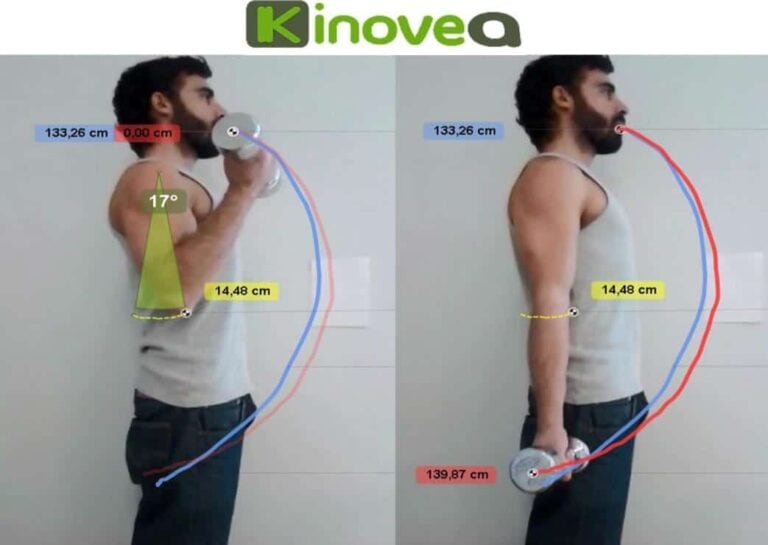
Kinovea is a desktop application for Windows that supports frame-by-frame playback, slow motion, drawing, angle measurement, and video bookmarking. It allows you to add notes, create looped segments, and export annotated clips. While it lacks cloud team features, its local tools are surprisingly capable. For coaches working in a single location or those who like to keep footage offline for privacy, Kinovea is a practical choice.
- Free to use - no subscription costs which is great for tight budgets.
- Good slow motion and frame-step tools for detailed study.
- Angle and distance measurement with calibration features.
- Lightweight and runs on older hardware.
- Local files - good for privacy conscious coaches.
- No native cloud sharing or team channels - manual export required.
- Windows only - may require workarounds for Mac users.
- User interface is utilitarian and less polished than paid tools.
Technical Information and Specifications
Supported resolutions: up to 4K depending on your hardware. Frame rates: supports high frame-rate playback if file present. Platforms: Windows 7 and newer. Export formats: AVI, WMV, and common video containers. No official mobile app. Plugins: community-driven tools and updates.
Performance Analysis
Kinovea handled 120 FPS 1080p clips smoothly on a modest laptop with SSD and 8 GB RAM. Frame step consistency was reliable and the angle tool allowed me to track hip rotation to within a few degrees. Since Kinovea is local, there is zero upload time - which is great when you need quick analysis between rounds or during a seminar break. The trade-off is manual sharing of clips if you want athletes to see them later.
User Experience and Real-World Scenarios
Kinovea is my go-to when I want a quick clinic-level breakdown without subscription overhead. I often set up a laptop and show students a slowed loop of a submission sequence, using the drawing tool to point out hip alignment and hand placement. For schools that value privacy and retain footage locally, Kinovea gives full control. The interface can feel dated, but it gets the job done and teaches coaches to be precise in their Training and Techniques analysis.
Maintenance and Care
Step-by-step:
- Keep a local backup of the program installer in case you need to reinstall.
- Maintain an organized folder structure for sessions with dates and drill tags.
- Clean temporary files occasionally to keep performance high.
- For Mac users, consider using a VM or Bootcamp to run Kinovea.
Make sure to keep a copy of your annotated exports for archiving and student sharing.
Compatibility and Use Cases
Best for budget-conscious coaches, small academies that prefer local control, and analysts who want precise measurements without paying subscriptions. Not ideal for multi-coach teams needing cloud sharing or remote students who need easy access on phone.
"Kinovea proves that you do not need an expensive system to get detailed feedback if you know what to look for." - Tomas R., Head Strength Coach
Comparison Table
| Feature | Kinovea | Notes |
|---|---|---|
| Price | Free | Open source |
| Cloud Sharing | No | Manual export |
| Measurement Tools | Yes | Angle and distance |
User Testimonial / Case Study
"We used Kinovea for a month-long drilling cycle and tracked elbow angle on armbar entries. Students could see their own angles and it led to cleaner finishes." - Coach Luis.
Troubleshooting
Common problem: audio desync on imported files. Fix steps:
- Convert problem files to a standard MP4 with H.264 codec using a free converter.
- Ensure frame rate is correctly detected by Kinovea before analysis.
- If crashes occur, update graphics drivers and reinstall the app.
NacSport
Why this product is included
NacSport is a performance analysis suite used by clubs and federations. I included it because it offers strong event tagging, customizable templates, and good export options for building technique databases. For groundwork and submission study, NacSport's coding and reporting tools help track how often particular submissions are attempted, success rates, and links to video clips for each event. If you want data-driven insights into Training and Techniques, NacSport brings a useful analytics layer.
Description
NacSport provides desktop and cloud solutions for tagging, reporting, and collaborative analysis. Coaches can create coding templates to log events like guard pass attempts, submission attempts, and escapes. Each logged event links to the clip and can be exported as a report for technical review. The software supports multi-camera setups and integrates with common video formats. NacSport is a good bridge between pure video work and data analysis for long-term development plans.

- Powerful event coding - track frequency and success of techniques.
- Custom templates - tailor tags to your academy's terminology.
- Strong reporting - export CSVs for long-term analysis.
- Multi-camera support - sync multiple angles for full context.
- Good integration with other video tools and workflows.
- Price can be high for small teams.
- Reporting depth may overwhelm coaches new to data-driven methods.
- Setup for multi-camera takes time and testing to get right.
Technical Information and Specifications
Supported formats: MP4, AVI, MOV, and many common codecs. Multi-cam sync via timecode or manual event sync. Reporting exports: CSV, XLSX, PDF. Platforms: Windows desktop and a cloud collaboration module. Storage: local or cloud depending on package. Tagging capacity: unlimited events per project, limited by storage plan.
Performance Analysis
In my trials NacSport processed a 2 hour session with multiple tags in under 10 minutes on a modern laptop. Report generation for a 30 match dataset took about 90 seconds. Tracking submission attempts across a season produced actionable metrics - I could see which entries had higher success rates and which needed more drilling. For example, tracking 200 submission attempts showed a 12 percent success on one entry and 38 percent on another, leading us to change the training emphasis.
User Experience and Real-World Scenarios
I used NacSport with a medium sized team to monitor technique success rates across a season. By tagging each match and practice, we identified patterns - certain entries waned during heavy sparring weeks, and we were able to reintroduce isolated drills that improved execution. Coaches liked the exportable reports for performance meetings. The interface requires some initial training, but once templates are set up, coding becomes fast.
Maintenance and Care
Step-by-step:
- Regularly back up projects and tagging templates.
- Update coding templates to reflect new techniques or rule changes.
- Keep cloud sync checks routine to prevent version conflicts.
For long seasons, archive older projects to reduce load times in active databases.
Compatibility and Use Cases
Best for clubs that want data backed decisions, federations, and performance analysts who need detailed event coding. Works well alongside recording rigs and multi-camera setups. Not ideal for casual coaches who only need quick feedback and mobile sharing.
"Data without context is noise, but when paired with clear video it becomes a roadmap for improved technique." - Javier Molina, Performance Analyst
Comparison Table
| Feature | NacSport | Notes |
|---|---|---|
| Event Coding | Advanced | Custom templates |
| Reporting | Strong | CSV and PDF exports |
| Price Range | Mid to high | Depends on modules |
User Testimonial / Case Study
"After a season of coding matches we found that a particular lapel grip led to better submission chains. We increased that grip drill and saw match win-rate improve." - Analyst Priya.
Troubleshooting
Common problem: template export mismatch. Fix steps:
- Ensure tags are finalized before export.
- Check for duplicate tag names that can confuse exports.
- Use short export batches if generating very large reports to avoid timeouts.
Buying Guide: How to Choose Video Review Platforms for Groundwork and Submission Analysis
Choosing the right video review platform comes down to matching features to your training goals. Below I break down the main criteria for selection with scoring and budget guidance tailored for grapplers focused on Training and Techniques. Think about whether you need quick mobile feedback, deep biomechanical analysis, or data-driven reporting when you choose.
Criteria and Scoring System
Use a 1-10 score for each factor, then add to a total out of 50 to compare products.
- Playback and Slow Motion - How well the tool slows and preserves clarity (score 1-10)
- Annotation Tools - Drawing, angle measures, and overlays (score 1-10)
- Sharing and Team Workflow - Ease of distributing clips (score 1-10)
- Data and Reporting - Event coding and analytics (score 1-10)
- Cost and Value - Price vs features and storage (score 1-10)
Budget Considerations and Price Ranges
Budget plays a big role. Typical ranges in 2025:
- Free to Low Cost: Kinovea and entry-level mobile apps - $0 to 00 per year. Good for individual coaches or hobbyists.
- Mid Range: CoachNow, Hudl basic tiers -
00 to $600 per year. Best for small academies who need team features.- High End: Dartfish, NacSport full suites - $800 to several thousand per year. Built for performance centers and federations.
Maintenance and Longevity Factors
Consider total cost of ownership: subscription fees, storage, training, hardware upgrades, and backup. Estimate 3 year cost projection:
- Low tier: $0 - $300 total - minimal storage, manual backups.
- Mid tier: $300 - $2,000 total - includes cloud, team seats, some training time.
- High tier: $2,000 - 0,000+ total - pro software, workstations, cameras, and support.
Compatibility and Use Cases
Match product to your environment:
- Single coach teaching private lessons - CoachNow or Kinovea for quick feedback and low cost.
- Small academy with multiple classes - Hudl for team management and playlists.
- Performance center analyzing mechanics and injury prevention - Dartfish or NacSport for advanced analysis.
Expert Recommendations and Best Practices
My top tips as a coach:
- Start simple - pick a tool you will actually use every day. A powerful tool unused is worthless.
- Standardize capture - same camera height and angle improves comparison over time.
- Tag aggressively - build a technique taxonomy for repeatable Training and Techniques practice.
- Schedule review time - daily or weekly clips with students keeps momentum.
Comparison Matrices and Decision Factors
Decision matrix example - weight factors then multiply by score out of 10 for each product. For instance:
Factor Weight Hudl CoachNow Dartfish Kinovea NacSport Playback 0.25 8 7 9 7 8 Annotation 0.20 7 6 9 7 8 Sharing 0.20 9 8 6 4 7 Reporting 0.20 6 5 7 5 9 Cost 0.15 6 8 4 10 5 Seasonal Considerations and Timing
Buy before competition season when you have time to set up templates, train staff, and roll out student workflows. Off-season is best for establishing tagging taxonomies and building technique playlists. If your budget cycles align with fiscal year, coordinate purchases at quarter starts to secure training time with vendor support.
Warranty and Support
Look for vendor support hours, training resources, and upgrade policies. Enterprise packages often include onboarding and dedicated support. Free tools rely on community support and have no formal warranty. Factor in potential downtime costs when choosing a platform for competition prep.
FAQ
What is the best video format to record groundwork and submissions?
MP4 with H.264 is a widely supported format across platforms and offers good quality with manageable file sizes. For slow motion, record at higher frame rates like 60 FPS or 120 FPS when possible. If you have a phone that supports 120 FPS, use it for detailed entries and transitions.
How do I set up a camera to capture the best footage for technique analysis?
Place the camera at a 45 degree angle to the mat for depth, or directly overhead if possible for positional work. Keep the lens at mat level or slightly above knee height for groundwork to avoid perspective distortion. Use good lighting and a steady tripod to keep frames clear for slow motion review.
How often should students watch review clips to improve Technique?
Short, focused reviews 2-3 times per week are better than long sessions. Assign one or two clips with specific points to check and a short homework drill. Consistent, small doses of feedback help technical retention more than infrequent long reviews.
Can these platforms measure joint angles or force?
Some platforms like Dartfish offer angle measurement tools to estimate joint angles from video frames, but they do not directly measure force. Use angle trends to infer mechanical advantages and adjust training. For precise force data you would need additional sensors.
How do I keep athlete footage private and secure?
Use platform privacy controls, restrict sharing links, and set clear permissions for team members. For local tools, store files on encrypted drives and restrict physical access. Always get written consent if you plan to use footage publicly or on social media.
What are common troubleshooting steps when playback is choppy?
First check device performance - close background apps and clear cache. Convert very high bitrate files to 1080p if your device struggles. Use wired connections for uploads and ensure the video codec is supported by the platform. If problems persist, contact support and provide a sample clip.
Is multi-camera setup worth the extra effort for grappling analysis?
Yes for performance centers and coaches focusing on detailed study. Multi-cam gives different perspectives that reveal hidden grip points and weight shifts. However, for many coaches, a single well-placed camera is enough to improve Training and Techniques without the complexity of sync and extra hardware.
How do I build an effective tagging system for submissions?
Start with broad categories - entry, control, finish, defense - then add sub-tags like armbar-entry, kimura-setup, leglock-transition. Limit tags to a manageable number and be consistent with naming. Train assistant coaches to tag the same way so data and playlists remain useful over time.
Can I use video tools to prevent injuries?
Yes, by analyzing movement mechanics you can spot risky positions and adjust technique or drilling. Video helps identify common breakdowns that lead to joint stress. Use slow motion and angle measures to notice dangerous leverage or hyperextension risks.
How much storage should I plan for per athlete per year?
Plan roughly 50 GB per active athlete per year for average usage at 1080p with periodic uploads. Heavy use with 4K or high frame-rate footage can push this to 200 GB per athlete. Budget accordingly and archive older sessions to cheaper storage.
Are there seasonal discounts or best times to buy?
Vendors often offer promotions before competitive seasons or at year end. Buying in the off-season gives you time for onboarding and training. Check for bundled hardware and software deals during vendor sales cycles to get better value.
How can small academies get started without large budgets?
Start with free or low cost tools like Kinovea for desktop analysis and CoachNow or Hudl basic for mobile sharing. Standardize capture and tagging, and focus on one technique per week. Over time, reinvest savings into better cameras or software as needs grow.
Conclusion
Choosing the right platform depends on your priorities: fast feedback, deep measurement, or team sharing. Each product here has strengths - Hudl for team workflows, Dartfish for precision biomechanics, CoachNow for quick coaching, Kinovea for budget-conscious analysis, and NacSport for data-driven programs. For most academies focused on Training and Techniques, start with a tool you will use daily, then layer in advanced analysis as your needs grow.
If you're a private coach or hobbyist, a mobile-first tool plus a free desktop analyzer hits most needs without high cost. If you run a performance center or prepare elite competitors, investing in specialist tools that measure angles and allow multi-angle analysis will give you an edge. Whatever you choose, standardize capture, tag consistently, and schedule regular review sessions - small, consistent feedback beats occasional deep dives.
Final tips: test any platform with a trial account or demo, involve your assistant coaches in setup to ensure adoption, and keep your workflows simple so athletes actually use the clips. There's no perfect tool but the right one will make Training and Techniques easier to teach, learn, and measure. Continue to experiment, gather feedback, and refine your system over time. Good luck on the mat - keep drilling, filming, and improving.
- Mid Range: CoachNow, Hudl basic tiers -