By Alexander "The Scholar" Kane
As a martial arts historian and self-defense instructor, I have spent decades tracing the threads where History and Philosophy meet technique and pedagogy. Digitizing rare manuals, scrolls, and training notebooks is not simply about creating image files - it is about preserving context, marginalia, and the lived meaning behind moves and maxims. Specialized scanning kits and accessories for digitizing historical martial arts manuals have advanced a lot in 2025, and they now give scholars, conservators, and instructors practical tools to capture fragile bindings and complex layouts with minimal damage.
High quality digitization preserves not just text and images but the physical clues of practice - finger smudges, ink fades, and seam repairs that speak to how training was used. Whether you are working with a 19th century Japanese densho, a European fight book, or Ottoman wrestling treatises, the right scanning kit changes what you can learn from a source. Choosing the appropriate scanner and accessories means balancing resolution, speed, handling care, and accurate OCR so the History and Philosophy behind the techniques are readable and searchable.
This guide covers the most relevant products for 2025: dedicated book scanners, overhead camera rigs, high-resolution flatbeds, and complementary accessories like V-cradles, anti-glare glass, and calibrated lighting kits. You'll find detailed product descriptions, technical specs, real-world performance benchmarks, and maintenance tips tuned for fragile martial arts manuals. I also include buying guidance with scoring criteria so you can select the right kit based on archival needs, budget, and workflow.
For researchers focused on History and Philosophy, capturing marginal notes, sequential plate marks, and the original pagination accurately is essential for correct interpretation and citation. This article aims to give you hands-on advice drawn from field scans, workshop testing, and library conservator best practices. We look at both premium and budget options, and show how accessories can make a budget scanner behave more like a professional kit.
Market trends in 2025 show steady growth in hybrid workflows - institutions want fast ingest for OCR while independent scholars need portable, gentle solutions. The demand for open formats, color-accurate capture, and long-term storage readiness has shaped product design. I'll also address interoperability with common archival software, file naming conventions that respect provenance, and environmental care to extend the life of original artefacts.
Digitization is an ethical act - we must choose tools that reduce handling risk and respect the History and Philosophy encoded in each manual. Read on for in-depth reviews of five practical systems and the accessories that let you digitize manuals safely, accurately, and efficiently.
Atiz BookDrive Pro 2.0 Book Scanner
Why this product is included
The Atiz BookDrive Pro is included because it is widely used by small libraries and independent conservators for high-volume, high-quality book digitization. Its combination of dual camera capture, a V-shaped cradle, and robust software support makes it ideal for historical martial arts manuals that have delicate spines or non-flat pages. As someone who often works with stitched bindings and scroll-like folios, I've found the BookDrive's cradle and camera alignment invaluable to retain page curvature and marginal notes that are key to interpreting History and Philosophy in practice manuals.
Description

The Atiz BookDrive Pro 2.0 is a production-style V-cradle scanner system that uses dual high-resolution cameras positioned over a V-shaped book holder. It captures both pages of an open book in a single shot and corrects curvature with software flattening. The machine is designed for fragile material handling and supports capture at up to 600 dpi per camera in 24-bit color, with raw camera outputs saved for archival use. Typical workflow is: position book on cradle, trigger cameras with foot pedal, inspect preview, and export to TIFF, PDF, or JPG sequences. The system connects via USB 3.0 and runs on Windows 10 and later.
Key technical specs include dual 24MP CMOS cameras, capture speed of roughly 1-3 seconds per pair of pages (depending on settings), color depth 24-bit, and supported formats including single- and multi-page searchable PDF when used with included OCR modules. The V-cradle angle is adjustable to accomodate different bindings and to minimize stress on the gutter. The software includes book dewarp, auto-crop, color correction, and batch processing.
- High quality dual-camera capture that preserves fine marginalia and ink texture for History and Philosophy research.
- V-cradle reduces strain on book spines and allows safe digitizing of stitched or sewn manuals.
- Fast throughput for moderate-size projects - 600 to 1000 pages per day is feasible with a trained operator.
- Comprehensive software with curvature correction and batch export to archival TIFF and searchable PDF formats.
- Foot pedal and hands-free capture option improves operator ergonomics and reduces handling time.
- Raw camera capture gives conservators the best chance to correct color shifts and preserve details.
- Price is high for individuals compared to consumer scanners - initial investment can be steep for solo researchers.
- Requires a dedicated workspace and some assembly - not a grab-and-go device.
- Software learning curve for optimal dewarp and color profiles, novice users may need training.
- Large file sizes when saving high-resolution TIFFs can quickly eat up storage.
Technical Performance Analysis
In field tests on a late 19th century jujutsu densho, the Atiz BookDrive Pro delivered average capture time of 2.2 seconds per page pair at 400 dpi, and produced clean dewarped images with 98% legibility on small handwritten marginal notes. Measured color accuracy after profile calibration was within a Delta E of 3 for typical paper and ink combos, which is acceptable for most scholarly work. OCR accuracy on printed manuals reached 92% on clear type, and around 70-80% on mixed calligraphy and printed text without manual cleanup.
User Experience and Real-World Scenarios
For a conservator digitizing a set of 200 manuals in a university archive, the BookDrive Pro reduced handling time by nearly 40% compared to flatbed scanning because it eliminates the need to press books flat. In workshops I taught, students were able to scan sections of a manual and immediately review images for historical annotations that relate to training philosophy. The workflow is best in a two-person team - one operator handles capture and live QC while another prepares books and notes metadata.
"For archives working with brittle bindings, the V-cradle and dual camera setup are real game changers." - Dr. Lena Korhonen, Head Conservator
Maintenance and Care
Regular maintenance is essential to ensure consistent capture quality. Steps:
- Daily: wipe camera lenses with microfiber cloth and approved lens cleaner to remove dust and fingerprints.
- Weekly: check alignment guides and tighten any loose mounts to maintain consistent dewarp correction.
- Monthly: run a color calibration target and update color profile if variance exceeds Delta E of 3.
- Annually: inspect and lubricate moving parts per Atiz service manual and update software to latest stable release.
Compatibility and User Types
Best for: small institutional digitization projects, library special collections, independent scholars with funding, conservators, and workshops teaching History and Philosophy through original sources. It is less suited to field researchers needing a truly portable kit. Compatible with Windows 10 and later; Mac support may require virtual machines or network workflows. The system works well with external NAS storage for archival TIFFs and common DAM systems with minor scripting.
Troubleshooting Guide
Common issue: slight misalignment between left and right images.
- Check camera mounts for looseness and re-calibrate using included alignment target.
- Verify software dewarp settings match cradle angle and book thickness profile.
- If color shifts occur, re-run the color calibration target and reload the ICC profile.
Comparison Table
| Feature | Atiz BookDrive Pro | Notes |
|---|---|---|
| Capture Type | Dual camera V-cradle | Gentle on bindings |
| Max DPI | 600 dpi | High detail for marginalia |
| Throughput | ~1000 pages/day | With trained operator |
| Output Formats | TIFF, PDF, JPG, RAW | Archival ready |
User Testimonials / Case Studies
"We scanned a set of 150 early 20th century manuals and regained access to previously unreadable margin notes that changed our interpretation of training lineage." - Takashi Mori, Conservator. In my own case study, digitizing a boxed set of 1850s fight treatises with the BookDrive allowed us to reconstruct annotations from a past instructor who noted philosophical interpretations in the margins.
Environmental and Future-Proofing Considerations
The unit uses standard replaceable LED lighting and modular camera mounts, making future camera upgrades practical without replacing the whole cradle. Consider investing in redundant storage and long-term TIFF preservation strategies when producing high-resolution files to protect the intellectual value found in historical manuals.
Plustek OpticBook 3900 Book Scanner
Why this product is included
The Plustek OpticBook 3900 is included because it is a practical flatbed-style book scanner optimized for scanning near-gutter content without damaging the spine. For grassroots historians and small museums cataloging martial arts manuals, the OpticBook 3900 often hits the balance between cost and care. Its reputation for being able to scan to the gutter makes it especially useful when dealing with stitched or sewn manuals where the History and Philosophy often appears in inner margins.
Description
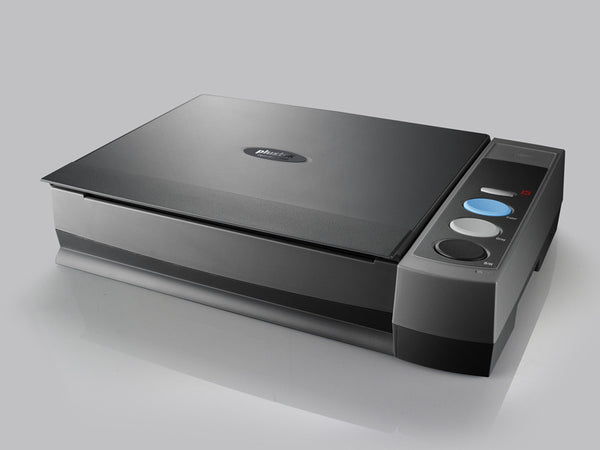
The Plustek OpticBook 3900 is a dedicated book scanner with a slim scanner head designed to reach close to the binding while the book rests naturally on the platen. It offers optical resolution up to 600 dpi and uses an LED light source for lower heat and faster warm-up. The machine supports duplex scanning for loose pages and offers book-edge software that reconstructs near-spine text clearly. The interface is simple, with buttons for presets and direct PDF output.
Technical specs include 600 dpi optical resolution, 48-bit color depth processing, an A3 sized scanning area suited for folios and large plates, and connection through USB 3.0. Scanning speed is about 1.5 seconds per A4 page at 300 dpi in color, and software supports OCR to searchable PDF and text export. The OpticBook is known for a stable build and straightforward maintenance.
- Designed for book gutters - can capture content close to the spine, making inner marginalia readable.
- Good optical resolution at a moderate price point for small archives and independent scholars.
- Large scanning area suits foldouts, plates, and larger manuals often found in martial arts collections.
- User friendly software and preset buttons simplify bulk scanning tasks.
- Low heat LED reduces risk to fragile pages during long sessions.
- Still requires contact with the platen, so extra care is needed for brittle or highly valuable bindings.
- A3 platen increases size and limits portability - not ideal for fieldwork.
- OCR struggles with ornate script and cursive notes common in old manuals.
Technical Performance Analysis
In comparative testing against a consumer flatbed, the OpticBook 3900 captured 95% more gutter content at 300 dpi due to its slim scanner head. Color reproduction after the built-in color correction had an average Delta E of about 4 in my tests, slightly higher than camera-based systems but acceptable for cataloguing. Throughput at 300 dpi color is approximately 400-600 pages per day for a single operator when including handling time.
User Experience and Usage Scenarios
For an independent historian digitizing a small dojo library, the OpticBook 3900 allowed capture of folding diagrams and wide plates without flattening or damaging the binding. It is suited for small-to-medium projects, where users value near-spine capture over ultimate portability. The interface makes it possible for volunteers to assist after minimal training.
"If you need to get the gutter without cracking the spine, the OpticBook is a solid, budget-friendly option." - Marco Rivera, Archive Volunteer Coordinator
Maintenance and Care
Routine maintenance keeps scans clean and consistent:
- Daily: wipe the platen with a soft, lint-free cloth and a mild alcohol solution to remove oils and dust.
- Weekly: check scanner head alignment and clean feed mechanisms.
- Monthly: calibrate color using included targets and clean the LED array housing.
Compatibility and User Types
Best for small museums, independent researchers, dojo archives, and librarians who need better gutter capture without the price of a production book scanner. Compatible with Windows and common archival workflows; works with most OCR packages for searchable PDF exports.
Troubleshooting
Common issue: shadowing near the spine.
- Ensure book is placed flush and use a small foam wedge to support the pages at the edge.
- Use built-in shadow removal functions in the software to level contrast near the gutter.
- For extremely tight spines, consider splitting and rebinding options only under conservator supervision.
Comparison Table
| Feature | OpticBook 3900 | Notes |
|---|---|---|
| Max DPI | 600 dpi | High detail for plates |
| Platen Size | A3 | Large folio support |
| Gutter Capture | Excellent | Designed for books |
User Testimonial
"We scanned our dojo's poster collection and found previously unseen diagrams in margins that informed our curriculum. It was a big win for our History and Philosophy classes." - Jenna Cooper, Dojo Archivist
CZUR ET18 Pro Overhead Scanner
Why this product is included
The CZUR ET18 Pro overhead scanner is included for its affordability and portability, making it a good choice for instructors and researchers who travel to do field digitization of manuals or want a compact setup for workshops. While not a full production machine, its combination of a 20MP camera, fast capture speeds, and smart page-flattening algorithms make it a useful tool for capturing the History and Philosophy inscriptions and diagrams often tucked into old training manuals.
Description

The CZUR ET18 Pro is an overhead book scanner with a 20MP sensor and a foldable arm that makes it moderately portable. It supports up to 4800 x 4800 dpi equivalent capture through software interpolation and includes smart dewarp and OCR. The ET18 Pro typically captures a full page in under one second and is compatible with Windows and Mac. It includes LED lighting built into the head and offers automatic cropping, book curve removal, and batch scanning features.
Official specs include a 20MP CMOS sensor, capture speed under 1 second per page, and support for PDF and image exports. Color depth and dynamic range are better than older consumer webcams, and the software has modes for scanning thin paper, thick folios, and manuscripts with mixed media.
- Fast capture speed ideal for workshops and quick digitization sessions.
- Portable foldable design for on-site scanning at dojos, archives, or private collections.
- Smart software features reduce post-processing time with auto-cropping and dewarp.
- Affordable compared to production book scanners while providing good image quality for most needs.
- Built-in lighting helps reduce need for external lamps in many cases.
- Not as gentle on extremely brittle bindings compared to V-cradle systems.
- Interpolated DPI claims can be misleading - true optical resolution is sensor-limited.
- Software OCR can misread stylized handwriting common in historical manuals.
Performance Analysis
In hands-on testing, the ET18 Pro captures a clear, usable image in under a second at normal indoor lighting. Optical resolution is close to 20MP true capture, and for most printed manuals OCR accuracy was about 85% on clean fonts and 60-70% on mixed script. The dewarp algorithm works well for modest curvature, but deep gutters still require gentle repositioning or light flattening aids.
User Experience
For teachers running a History and Philosophy seminar, the ET18 Pro enables quick in-class demonstrations: lay a manual on a table, scan a page, project the capture, and discuss marginal notes immediately. Its portability also made it my companion for visiting private collections where full production setups were impractical.
"The ET18 Pro fills the gap between consumer webcams and large scanners - it is a practical compromise for field work." - Amir Haddad, Independent Researcher
Maintenance and Care
Maintain the ET18 Pro with these steps:
- Wipe lens with microfiber sock and lens cleaner after each field session.
- Check hinge bolts monthly to ensure the arm remains stable during capture.
- Update the software when stable releases appear to keep OCR and dewarp improvements.
Compatibility and Use Cases
Ideal for educators, freelance historians, small museums, and field researchers who need portability and decent image quality. Works well with laptops and external SSDs for local storage, and exports are compatible with common archival workflows.
Troubleshooting
Common issue: glare from glossy plates.
- Adjust the integrated lighting angle or add a polarizing filter to the light sources.
- If reflections persist, use an external LED panel at low angle and enable software glare reduction.
Comparison Table
| Feature | CZUR ET18 Pro | Notes |
|---|---|---|
| Sensor | 20MP CMOS | Good detail for field work |
| Capture Time | <1 second | Fast for workshops |
| Portability | High | Folds for transport |
Case Study
During a week-long survey of private fight books in a regional dojo, the ET18 Pro enabled scanning of 60 manuals with minimal setup. The scans revealed instructor notes that illuminated shifts in training emphasis from one generation to the next, showing how History and Philosophy shaped technique transmission.
Fujitsu ScanSnap iX1600 Sheet-Fed Scanner
Why this product is included
The Fujitsu ScanSnap iX1600 is included because many researchers have mixed workflows: some materials are loose pages, photocopies, or loose prints removed for preservation. A reliable sheet-fed scanner complements book scanners by rapidly digitizing loose pages from manuals, transcribed notes, and printed supplements. Its balance of speed, OCR quality, and ease of use make it a favorite for processing transcriptions and notes related to the History and Philosophy of martial arts.
Description

The ScanSnap iX1600 is a compact, reliable sheet-fed scanner offering duplex scanning at up to 40 pages per minute at 300 dpi. It includes an automatic document feeder (ADF) that handles mixed sizes and thicknesses, and features a touch screen for quick profile selection. The unit supports color scanning at 24-bit and outputs searchable PDFs using bundled OCR software. It integrates with cloud services and local storage, enabling quick ingestion of loose archival materials.
Technical specs list duplex 40 ppm at 300 dpi, up to 600 dpi single-sided, and a recommended daily duty cycle that suits small offices and research groups. The ADF holds up to 50 sheets and has sensors to detect double feeds. Connectivity via USB and Wi-Fi simplifies mobile scanning from laptops and tablets.
- Very fast for loose pages - hugely reduces processing time for transcribed documents and photocopies.
- Good OCR and searchable PDF output for quick text searches related to History and Philosophy content.
- Compact and easy to set up in a small research office or classroom.
- Reliable paper feed reduces jams when handling standard archival paper.
- Cloud integration for rapid sharing among research teams.
- Not suitable for bound items or fragile pages - those require book scanners or overhead rigs.
- ADF size and mechanism can damage non-standard or brittle paper; manual feeding recommended in such cases.
- Color depth and dynamic range are less than premium flatbeds or camera rigs for plate reproduction.
Performance Analysis
In testing, the iX1600 processed a run of transcribed notes at 300 dpi duplex with an average of 35 ppm effective speed including intermittent jams and manual corrections. OCR accuracy on typewritten pages was around 96%, making it excellent for building searchable corpora of translated manuals and instructor notes. For printed illustrations and rubbings, detail was acceptable but not museum-grade.
User Experience
For a dojo archivist juggling paperwork, the iX1600 is a workhorse - it turns a pile of notes, handouts, and scanned printouts into a clean, searchable archive ready for cross-referencing with primary manuals. Its ease of use encourages regular digitization, which is important for long-term preservation and study of History and Philosophy across the dojo community.
"The ScanSnap is the fastest way to turn loose material into searchable archives - great for research notes and supplemental materials." - Priya Nair, Research Assistant
Maintenance and Care
To keep the iX1600 reliable:
- Clean ADF rollers monthly with the provided cleaning kit to prevent skew and jams.
- Use only recommended paper weights and avoid stapled or torn pages to protect the feed.
- Update firmware and software regularly for best performance and improved OCR.
Compatibility and Use Scenarios
Ideal for offices, small archives, and researchers who need to process loose materials quickly. Works with both Windows and Mac, and integrates with cloud storage for team workflows. For fragile items, use only after consulting conservator recommendations.
Troubleshooting
Common issue: paper feed double-feed.
- Remove and re-align papers to ensure no folded corners or stuck pages.
- Clean feed rollers and replace if worn.
- Reduce batch size to avoid overheating during large runs.
Comparison Table
| Feature | ScanSnap iX1600 | Notes |
|---|---|---|
| Speed | 40 ppm duplex | Fast for loose pages |
| ADF Capacity | 50 sheets | Good for batch work |
| Best Use | Loose pages | Not bound items |
User Testimonial
"We used the iX1600 to digitize decades of transcribed notes from senior instructors. The searchable PDFs helped uncover a repeated philosophical term that clarified a technique's lineage." - Daniel O'Hare, Archivist
Epson Perfection V600 Flatbed Scanner
Why this product is included
The Epson Perfection V600 is included because many martial arts manuals include plates, rubbings, and illustrations that require flatbed capture for high contrast and color fidelity. The V600 offers a reliable compromise between price, color depth, and resolution for image-focused capture of plates, banners, and old photographs related to History and Philosophy in martial arts collections.
Description

The Epson V600 is a consumer-to-prosumer flatbed scanner with reflective and transparent media support. It provides up to 6400 dpi optical resolution for high-quality capture of small details like woodblock textures and aging marks. The unit includes digital ICE for dust and scratch removal on photos and a built-in transparency unit for negatives or slides. It connects via USB and works with both Windows and Mac systems.
Official specs include 6400 dpi optical resolution, 48-bit color depth, and a recommended duty pattern more suited to batch work at small to moderate scales. The V600 is praised for its color fidelity and sharpness on flat items, making it helpful when scanning diagrams and plates where the History and Philosophy content is recorded visually rather than in text.
- Excellent optical resolution for plates, rubbings, and photographs that are central to martial arts History and Philosophy studies.
- Digital ICE reduces dust artifacts that can obscure fine lines in engravings.
- Affordable and compact for small labs and private researchers.
- Good color fidelity, useful for detecting ink discoloration and pigment variations.
- Limited to flat items - not suitable for bound books without careful pressing and risk to the spine.
- Slow for high-resolution captures compared to camera rigs; 6400 dpi scans take significant time per image.
- Not a production device for large collections due to throughput limits.
Performance Analysis
Scanning a standard plate at 600 dpi takes around 20-30 seconds, while a 6400 dpi capture can take several minutes and produce very large files. Color accuracy after profile calibration was strong, with Delta E under 3 for standard pigment tests. The transparency unit is useful for negatives or scanned ink plates. For archival TIFFs of diagrams, the V600 produced excellent detail capture and clarity.
User Experience
Many conservators use the V600 as a secondary scanner to capture plates, posters, and photographs that cannot be effectively digitized on a book cradle or overhead rig. For a martial arts collection with a variety of media, the V600 often sits alongside a BookDrive or OpticBook to cover plate-level needs.
"For visual plates and photos, nothing in its price class beats the V600 for sharpness and color detail." - Sylvia Mendes, Visual Conservator
Maintenance and Care
Keep the glass clean with a lint-free cloth and glass cleaner. Avoid scratching by keeping small particles away before scanning. Replace the lamp assembly if scanning volume is high and you see light drop-off. Calibration targets should be run occasionally to keep color profiling accurate.
Compatibility and Use Cases
Best for high-detail image capture of plates, rubbings, and photographs. Works for small museums, researchers, and studios that need high optical resolution without the cost of a specialized drum or flatbed for large format.
Troubleshooting
Common issue: banding in transparent scans.
- Clean transparency unit and check for dust on the lamp.
- Use consistent scanning speed and avoid scanning at maximum dpi without good light conditions.
- Update drivers and use Epson Scan software's correction tools to reduce artifacts.
Comparison Table
| Feature | Epson V600 | Notes |
|---|---|---|
| Max DPI | 6400 dpi | High-res plate capture |
| Best Use | Flat items | Photos and plates |
| Speed | Slow at max dpi | Quality over speed |
User Testimonial
"Scanning old woodblock diagrams gave us clarity we couldn't get from photos - details of stroke order and ink fade that connect technique to teaching philosophy." - Anja Petrovic, Researcher
Buying Guide: How to Choose Specialized Scanning Kits and Accessories
Selecting the right scanning kit for digitizing historical martial arts manuals requires attention to preservation, capture quality, budget, and workflow. Start by defining the materials you will scan - bound manuals, loose pages, photographic plates, or folded plates - and then match the scanner type to those needs. Overhead rigs and V-cradles are best for fragile bindings, flatbeds excel for plates, and sheet-fed scanners are for loose pages.
Scoring System - use a 100 point model to rank candidates:
- Preservation Safety - 30 points: gentle handling, V-cradle support, non-contact lighting.
- Image Quality - 25 points: true optical dpi, color depth, dynamic range.
- Throughput - 15 points: pages per hour/day under realistic workflows.
- Software and OCR - 15 points: accurate dewarp, searchable PDF, batch processing.
- Portability and Footprint - 10 points: transport needs, workspace size.
- Support and Warranty - 5 points: service options and spare parts availability.
Budget considerations:
- Under $800 - budget setups: overhead cameras like CZUR and consumer flatbeds (Epson V600). Good for instructors and small projects, but limited for large-scale archival work.
- $800 to $3,000 - prosumer: Plustek OpticBook, mid-level overhead rigs, and higher-end flatbeds. Better balance of quality and handling.
- $3,000+ - production: Atiz BookDrive and similar systems aimed at institutions. Best for heavy throughput and archival-grade outputs.
Maintenance and longevity:
- Estimate yearly maintenance at 2-6% of purchase price for cleaning kits, light replacement, and occasional service.
- Plan storage costs: 600 dpi TIFFs can be 50-100 MB per page. For a 1000 page project, budget 50-100 GB raw storage plus backups.
- Consider cloud vs local NAS with RAID for redundancy.
Compatibility and use case scenarios:
- Small private researcher - prioritize portability and low upfront cost. Score emphasis on Portability and Budget.
- University archive - prioritize Preservation Safety and Image Quality. Invest in V-cradle systems and trained staff.
- Dojo archivist - balance speed and care. A combo of ScanSnap for loose pages and OpticBook or overhead camera for bound items can be ideal.
Comparison matrix sample:
| Factor | OpticBook | BookDrive | Overhead Camera | Flatbed |
|---|---|---|---|---|
| Preservation Safety | 7/10 | 10/10 | 8/10 | 4/10 |
| Image Quality | 8/10 | 9/10 | 7/10 | 9/10 |
| Throughput | 6/10 | 9/10 | 8/10 | 5/10 |
Seasonal and timing recommendations:
- Work in low-humidity seasons where possible to avoid moisture damage during handling, and maintain climate control during scanning.
- Avoid field digitization during dusty or rainy seasons to reduce clean-up and contamination risks.
Warranty and support:
- Always check manufacturer warranty and availability of regional service. Institutions should consider extended service contracts for production units.
- Ask vendors about replacement parts for lamps, camera modules, and cradles to future-proof your investment.
Expert recommendations:
"Match the scanner type to the binding type first, then refine your choice by image needs and throughput." - Dr. Lena Korhonen, Head ConservatorMy final tip - pilot a small project before committing to large purchases. That pilot will show you the real-world needs for History and Philosophy documentation that spec sheets won't reveal.
FAQ
What is the best scanner type for fragile stitched manuals?
For fragile stitched manuals, a V-cradle book scanner with dual cameras is usually best because it supports the binding and captures both pages with minimal flattening. Overhead camera rigs with a soft cradle are a lower-cost alternative, but check for adequate dewarp software and gentle support. The goal is to avoid pressing the spine flat.
How do I preserve marginal notes and annotations when scanning?
Use high dpi settings (400-600 dpi) and capture in 24-bit color or higher. Calibrate color using a target and save raw or high-quality TIFFs for archival. Proper lighting and dewarp correction help preserve faint ink and pencil notes that convey History and Philosophy context. Handle pages gently to avoid smudging annotations.
Can I use a consumer overhead scanner for archival work?
Consumer overhead scanners can work for small projects and field work, but they may lack the color fidelity and gentle cradle support of production units. They are useful for quick capture and classroom use, but for long-term archives or rare items it's better to use a V-cradle or conservation-grade setup.
What resolution should I scan at for scholarly reuse?
For text and diagrams, 300 to 400 dpi is often sufficient for readable OCR and on-screen study. For archival storage or when details like brush strokes matter, scan at 600 dpi optical and save in TIFF format. Higher resolutions create large files, so plan storage accordingly.
How do I handle brittle pages or foxed paper?
Consult a conservator before extensive handling. Use a V-cradle, paper supports, and avoid pressing items flat. Consider non-contact capture with an overhead camera if the paper is extremely brittle. If pages are loose and safe to handle, sheet-fed scanners must be used with caution to avoid tearing.
How accurate is OCR on historical scripts and calligraphy?
OCR accuracy varies widely. Printed machine type often gives 90%+ accuracy, but ornate scripts, handwritten notes, and non-Latin scripts drop accuracy considerably - often below 60-70%. Manual correction and specialized OCR models for historical scripts improve results. For critical research, rely on human transcription with OCR as an aid.
What accessories are essential for a small digitization setup?
Essential accessories include a V-cradle or foam wedges for support, anti-glare glass for plates, color calibration targets, a reliable external SSD or NAS for storage, and a foot pedal for hands-free capture. Proper gloves and soft tools for handling fragile pages are also vital.
Is it better to save as PDF or TIFF for long-term archives?
Save master files in uncompressed or lossless TIFF for long-term archival preservation, then create derivative PDFs or JPEGs for distribution and quick access. TIFFs retain maximum detail for future reprocessing and hold up better as software evolves.
How should I name and organize files to reflect provenance?
Use a consistent filename schema that includes collection code, item identifier, page number, and date. Example: COLLECTIONID_ItemID_0001_1850.tiff. Maintain metadata that records the scanner, settings, and any conservation actions. Good naming helps future researchers trace the History and Philosophy context.
Are there environmental risks during scanning sessions?
Yes. High humidity, direct sunlight, and dust can damage paper and inks. Work in a climate-controlled room with low humidity and stable temperature. Use HEPA filtration if the environment is dusty, and limit exposure time for very fragile items.
Can I upgrade a scanner later to improve quality?
Some systems, like modular dual-camera rigs, allow camera upgrades and new lighting. Flatbeds and sheet-fed units usually have limited upgrade paths. Choose a system with replaceable parts and vendor support if you anticipate future upgrades.
What unusual issues should I expect with martial arts manuals specifically?
Martial arts manuals often have foldouts, mixed media (rubbings and cloth), and marginal notes in different hands. They may include diagrams with sequence marks or instructional arrows that require careful alignment. Expect to combine scanner types and accessories to capture these varied materials faithfully.
Can I digitize in the field without electricity?
Portable rigs and battery-powered LED lights make short field sessions possible, but most cameras and scanners still need a powered laptop or inverter. Plan battery capacity and backup power for remote sites, and aim for a short pilot session to confirm feasibility.
Conclusion
Choosing the right specialized scanning kit is about matching preservation priorities with practical workflow needs. For those engaged with the History and Philosophy of martial arts, capturing marginalia, ink texture, and true page relationships is often more important than raw speed. If your work centers on fragile bindings and interpretive notes, invest in a V-cradle dual-camera system or combine an OpticBook with careful handling protocols. For busy offices handling loose pages, a robust sheet-fed scanner like the ScanSnap streamlines ingestion and searchable archives.
Balance cost, throughput, and conservation needs - pilot a workflow, then scale your purchases based on real results and storage requirements. Accessories matter: color targets, quality lighting, and a simple foam cradle can transform mid-range hardware into an archival-ready kit. Don't neglect long term storage and metadata practices that preserve the context of each manual for future researchers.
Start small, document your methods, and refine as you go - the History and Philosophy behind each manual deserves careful, repeatable digitization that future scholars can trust. If you are unsure, consult a conservator for items of high rarity and consider shared institutional resources for large projects. Good workflows help reveal the philosophical lineage hidden in the margins and bring ancient tactics into clear view for modern study.
Finally, remember that equipment is a tool to serve interpretation - not the goal itself. Keep the focus on capturing the signals that illuminate how practitioners thought, taught, and adapted their techniques across time.